
In April 2025, YouTube switched on automatic dubbing for every monetised channel — roughly three million creators, overnight. By early 2026 it covered 27 languages. If your plan for going multilingual was “dub my English videos”, that plan is now a free button that everyone else also has.
Which is worth sitting with for a second, because it kills the easy version of this strategy and leaves the harder, better one standing. The edge was never the translation. The edge is running a native channel in a market where advertisers pay more — and you can do that without speaking the language.
Why the same video earns different money in different places
Advertisers bid for attention market by market. A thousand views from Oslo, Sydney or Zurich are worth more to an advertiser than a thousand views from a market with less ad spend per head — not because the viewers are better, but because more money is chasing them.
You will find plenty of blog posts with tidy tables of “CPM by country”. Be careful with them. We compared several while researching this piece and they disagree by an order of magnitude on overlapping markets: one put Australia around $36 CPM, another put Norway at $5–15. They mix up CPM with RPM, quote different niches, and rarely say where the number came from.
Use your own numbers instead. In YouTube Studio, open Analytics → Revenue and scroll to the geography breakdown. That is your real RPM, for your niche, on your channel. It is the only figure worth planning around, and it is free.
The pattern you will almost certainly see: a handful of markets — the US, Canada, Australia, the UK, the Nordics, the German-speaking countries — pay several times what the long tail pays. That gap is the whole opportunity.
What changed in 2026: dubbing became a commodity
YouTube’s automatic dubbing adds alternate audio tracks to an existing video. It is genuinely good, it is free, and YouTube says the dubs do not hurt the original video’s discovery. There are limits — very long videos (over two hours) are not eligible, and the system skips content where dubbing makes no sense, like music.
But notice what it does and does not do. It gives your existing video a second audio track on your existing channel. Your title is still English. Your thumbnail is still English. Your description, your community posts, your channel name, your comment section: all still English. A German viewer who finds you gets an English-looking channel that happens to speak German.
That is a reach feature. It is not a market-entry strategy.
Auto-dubbing vs. a native channel
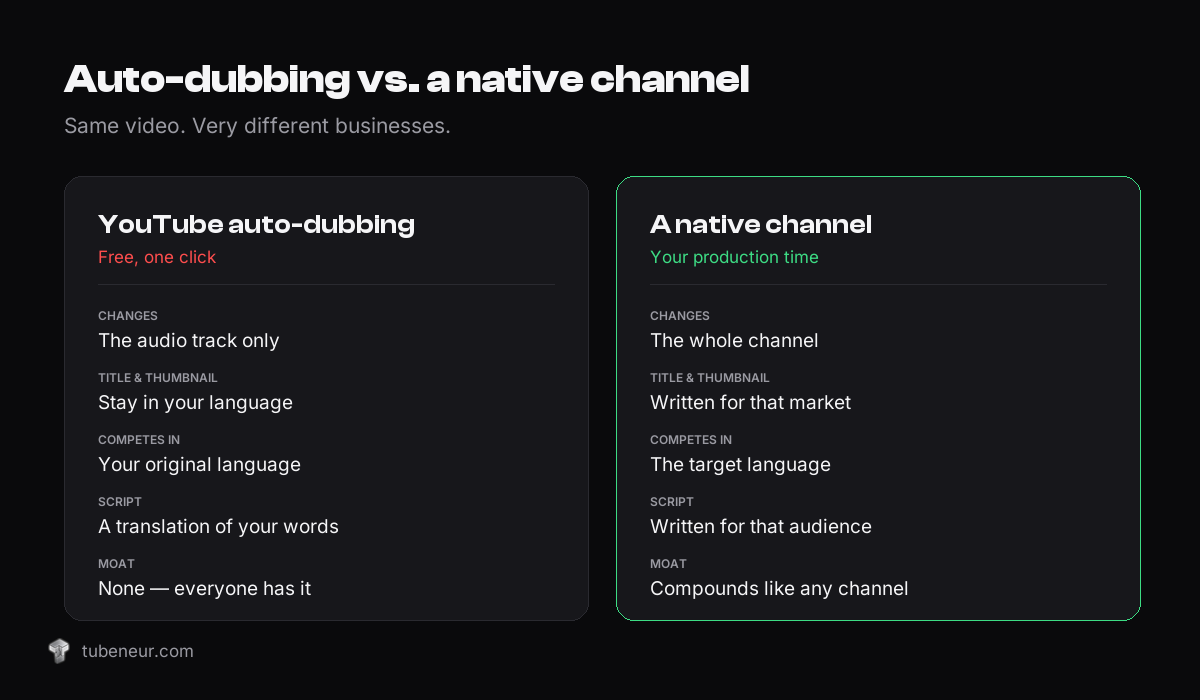
| YouTube auto-dubbing | A native channel | |
|---|---|---|
| Cost | Free | Your production time |
| What it changes | The audio track | The whole channel |
| Title & thumbnail | Stay in the original language | Written for that market |
| Search & browse | Competes in your original language | Competes in the target language, usually against far fewer channels |
| Script | A translation of what you already said | Written for that audience from the start |
| Effort | One click | A real second channel |
| Moat | None — everyone has the button | Compounds like any channel does |
The interesting column is the search one. In English, every decent topic already has fifty channels covering it. In Norwegian, Dutch or Danish, the same topic might have three — and the advertisers in those markets are still bidding hard. Less competition on the supply side, undiminished demand on the ad side.
The workflow, without speaking the language
Here is the loop, as a creator who only reads English actually runs it.
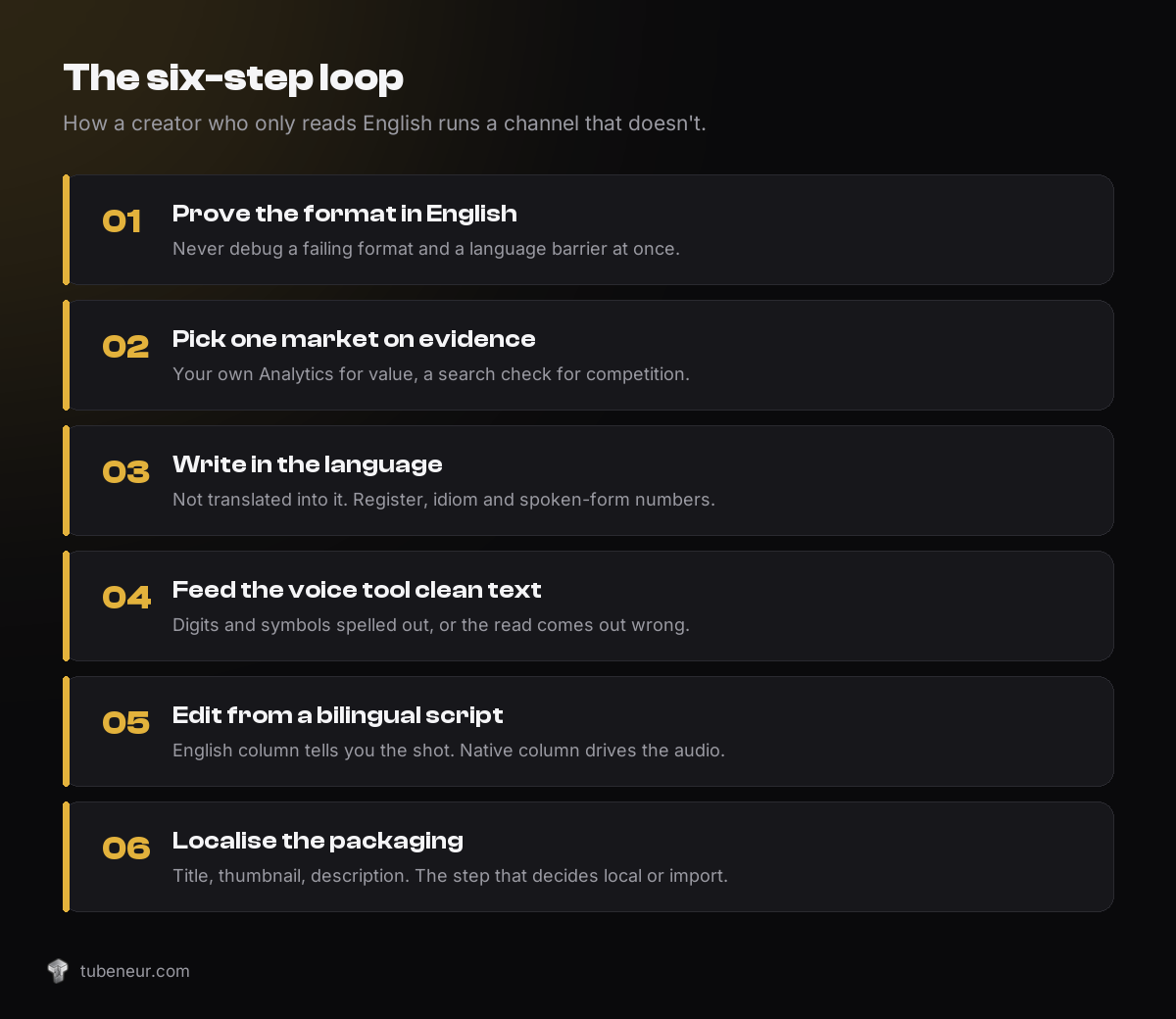
1. Prove the format in English first
Do not open a channel in a language you cannot read until you have a format that works in one you can. You need to know your hook holds, your pacing works and your retention is acceptable. Debugging a failing format and a language barrier at the same time is how people quit.
2. Pick one market, on evidence
One. Not five. Choose it from your own Analytics — where is your RPM already highest, and where does your topic plausibly travel? A history channel travels almost anywhere. A US-tax-code channel does not.
Then sanity-check supply: search your three best topics in the target language and count the serious channels covering them. Few results with healthy view counts is the signal you want.
3. Write the script in the language, not into it
This is where most attempts fall over. Run an English script through a generic translator and you get something a native speaker can feel is off within a sentence: the register slips, idioms land wrong, and numbers and dates come out as digits that the voice tool then mispronounces.
What you want instead is a script written as narration for that audience — with numbers and dates spelled out the way a narrator says them, sentence punctuation that suits the language, and one consistent level of formality throughout. German has du and Sie. Japanese and Korean have politeness levels. Getting that wrong is the difference between “a local channel” and “a foreign channel that hired a translator”.
4. Give the voice tool something it can read
Modern text-to-speech in a well-supported language is good enough to carry a faceless channel. It is also unforgiving about input: “1943” may be read as digits, “%” may be skipped, and a straight apostrophe can trip the prosody. Hand it clean, spoken-form text and the read comes out natural.
5. Edit from a bilingual script
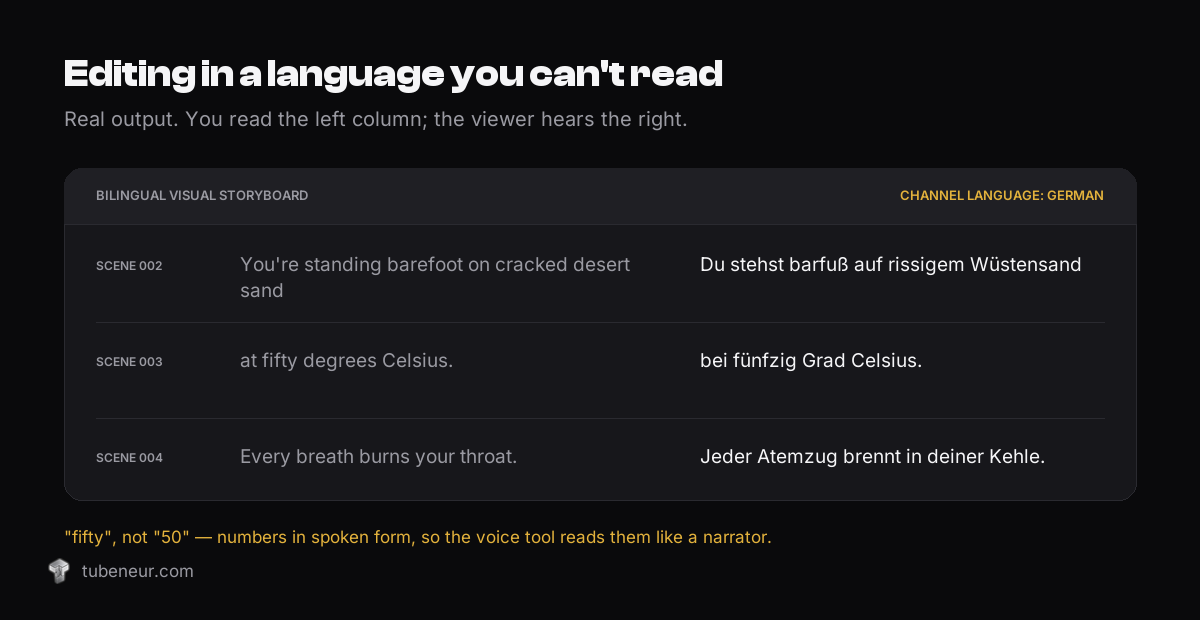
The part people assume is impossible is actually the easiest to solve. You cannot cut a video to a script you cannot read — so don’t. Work from a storyboard that carries both languages line by line: the English on the left telling you which shot goes where, the target language on the right driving the audio.
You are reading English the entire time you edit. The viewer hears only the target language. Scene 14 is scene 14 in both columns.
6. Localise the packaging too
Title, description, tags, thumbnail text, channel name and channel art. This is the step people skip, and it is the step that decides whether the algorithm files you as a local channel or an import. A German thumbnail with an English word in it reads as foreign instantly.
Where people get this wrong
- Launching four languages at once. Four half-run channels lose to one properly run channel, every time.
- Chasing the CPM table instead of the fit. The highest-paying market is worthless if your topic does not travel there.
- Never having a native speaker look at it. You do not need one on staff. You need one to read your first script and tell you if it sounds like a person. That one check is worth more than any tool.
- Auto-translated titles and descriptions. Viewers forgive an accent. They do not forgive a title that reads like machine output.
- Assuming it is passive. A second channel is a second channel. It needs uploads on a schedule like the first one did.
Is this legitimate?
Worth addressing directly, because “faceless channel in a foreign language” sounds like spam and often is.
The line is straightforward. Original research, an original script and real production value, delivered in another language, is a publisher doing what publishers have always done. Scraping someone else’s video, machine-translating it and reuploading is not — and YouTube’s reused-content rules exist precisely for that. The strategy in this post only works if what you are localising was worth watching in the first place.
How we handle the scripting step
We build Script Pro, a Windows desktop app for exactly this loop. You give it a URL, a transcript or a topic; it writes the English master script, then a voice-over-ready script in your target language with numbers and dates in spoken form, plus the bilingual storyboard described above and a visual prompt for every scene.
Seventy-five languages are in the picker, and you can type in any other. Six of them — German, Norwegian, Japanese, Korean, Thai and Arabic — have been run end to end and checked scene by scene on all three of its AI engines. We say “six”, not “seventy-five”, because those are the ones we actually tested. The language section on the product page goes through the detail.
It is bring-your-own-key, so you pay the AI providers directly rather than a subscription to us, and it is a one-time purchase. If the assembly step is what slows you down instead, VisualBeats takes a script, a voice-over and a folder of images and cuts them to the spoken word.
Frequently asked questions
Should I use auto-dubbing or start a separate channel?
Both, for different jobs. Leave auto-dubbing on for your main channel — it is free reach with no downside. Start a separate native channel when a specific market is worth owning: better ad rates, thin competition and a topic that travels.
Do I need to speak the language?
No, and that is the point. You need a script written properly for that audience, a bilingual storyboard so you can edit, and ideally one native speaker to sanity-check your first few scripts. What you cannot outsource is judgement about your own format.
Which language should I pick first?
Whichever one your own Analytics and a competition check agree on. If you want a starting shortlist, the German-speaking and Nordic markets usually combine strong ad rates with a much thinner field than English.
Will AI voice sound real enough?
In the well-supported languages, yes, for narration-led content. It is far weaker in smaller languages, and it is only as good as the text you feed it. Test one video before you commit to a channel.
How long before it pays?
Like any channel: months, not weeks, and it has to clear the Partner Programme threshold first. The advantage is that you are not guessing at the format any more — you are porting one that already works.
The short version
Auto-dubbing made translation free, which means translation is no longer worth anything on its own. What still pays is showing up in a valuable market as a channel that belongs there — native script, native packaging, native search results. The language barrier that used to make that impossible for a solo creator is now a tooling problem, and tooling problems get solved.
Skip the scripting bottleneck
Script Pro writes the English master script, the voice-over-ready script in your target language and the bilingual storyboard you edit from — from one URL, transcript or topic. One-time payment, bring your own AI key, no subscription.